

Environments
There are 3 different Serial environments:- Local Development: All services are run locally on the developer’s machine (including Supabase and Zuplo).
- Staging: A set of cloud services provisioned specifically for the sake of testing and developing new features
- Main (Production): The main set of cloud services that users of serial interact with
staging branch. The feature branch is run with a local database (supabase local development) and local api gateway (zuplo local development) and locally hosted frontend. After the feature branch is merged to staging it is tested before being merged to main for use by Serial users.
Note that main and production are use interchangeably but refer to the same environment
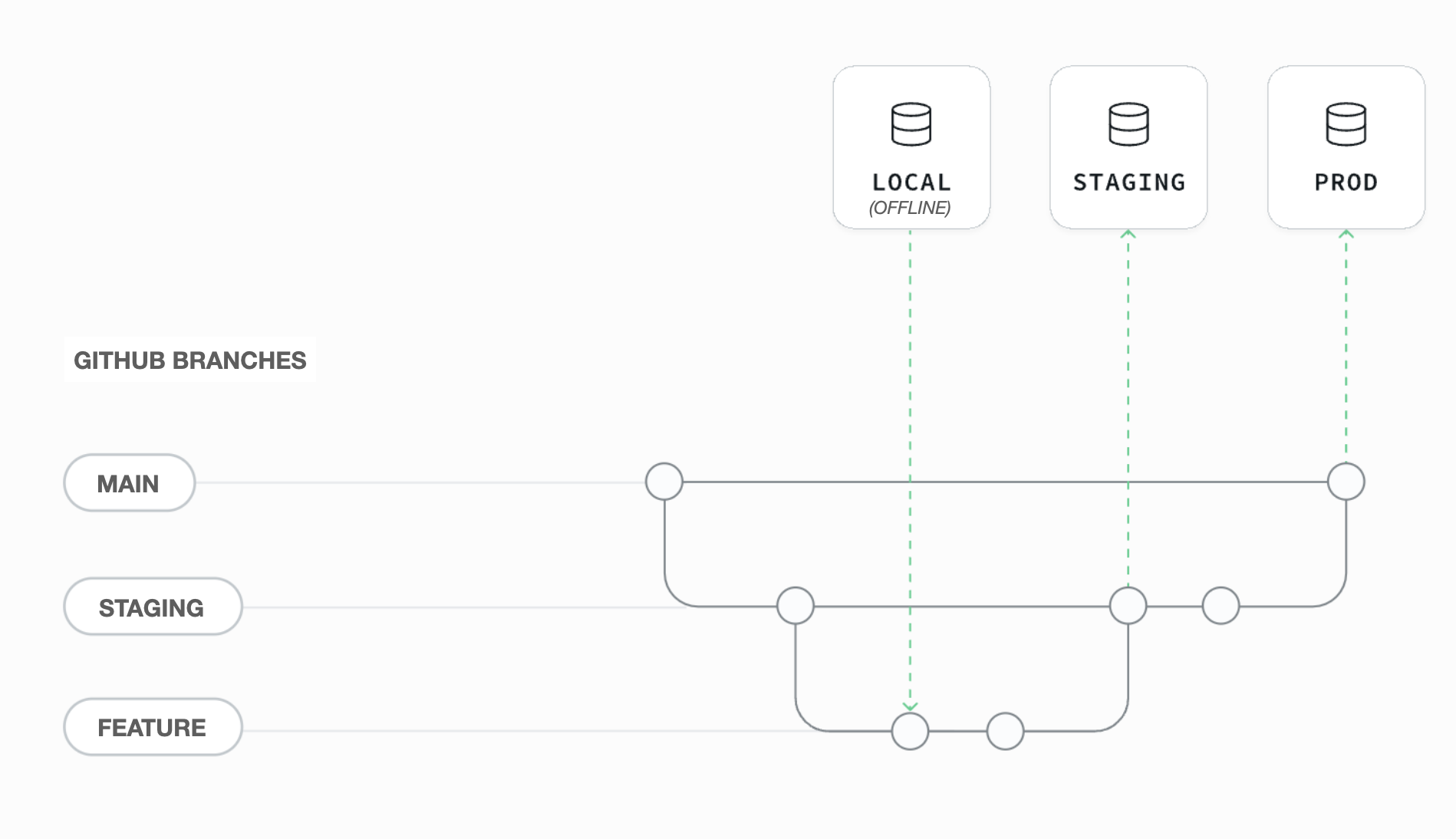 Simple read-only features features only affecting the frontend can often be built by connecting a locally hosted version of the frontend directly to the
Environment Variables
Zuplo and Vercel each have a set of environment variables that need to be setup for thestaging and prodcution. Github also has a set of environment variables used for CI/CD.
For local development the Zuplo and Vercel environment must be set en .env files in zuplo/.env and frontend/.env respectively. For convenience the Vercel / frontend environment variables are saved in 3 separate files .env.development, env.staging , and .env.production This allows the frontend to be against combination of local, staging and production cloud services for testing sake.
Below is an explanation of each environment variable:
Vercel
- VITE_APP_ENV_NAME: set to either staging, production or development depending on the environment
- VITE_APP_URL: the url of the frontend
- VITE_APP_SUPABASE_URL: the url of the supabase project
- VITE_APP_SUPABASE_ANON_KEY: the anon key for the supabase project (can be found in the supabase project settings → API page)
- VITE_APP_MAPBOX_TOKEN: a mapbox token for mapbox services (if using the Tracking feature)
- VITE_APP_SERIAL_API_URL: the url of the Serial API
- VITE_APP_MAINTENANCE_MODE: set to
trueto disable the Serial frontend - VITE_APP_REFRESH_INTERVAL: the interval for which new versions of Serial are checked for. If a new version is found, the user is prompted to refresh the page
Zuplo
- API_KEY_BUCKET_NAME: the name of the bucket that stores the api keys
- APP_URL: the url of the frontend
- ENV: the environment name (staging or production)
- SUPABASE_JWT_SECRET: the jwt secret for the supabase project (can be found in the supabase project settings → API page)
- SUPABASE_SERVICE_KEY: the service role key for the supabase project (can be found in the supabase project settings → API page)
- SUPABASE_URL: the url of the supabase project
- OPENAI_API_KEY: the api key for the openai project. Can be the same for all environments
- SERIAL_BUCKET_KEY: the root Zuplo managment API for creating and managing Zuplo serivices. Can be found in the Zuplo settings page under “Zuplo API Keys”
Github
- PRODUCTION_DB_PASSWORD: the password for the production database
- PRODUCTION_PROJECT_ID: the project id for the production database
- PRODUCTION_SERVICE_KEY: the service role key for the production database
- STAGING_DB_PASSWORD: the password for the staging database
- STAGING_PROJECT_ID: the project id for the staging database
- STAGING_SERVICE_KEY: the service role key for the staging database
- SUPABASE_ACCESS_TOKEN: the access token for the supabase project. Can be created on the supabase (account page)
- ZUPLO_API_KEY: the api key for the zuplo project. Can be found in the Zuplo settings page under “Zuplo API Keys”
- ZUPLO_TESTS_ENV: the environment variables for the CI Zuplo tests. See
.github/zuplo-tests.yamlfor an example